




You can use Cash App without linking a bank account by relying on your Cash App balance and the Cash Card. You can still send and receive money, make purchases, withdraw cash at an ATM, and load funds in stores. You only lose access to bank-based deposits and instant transfers.
Table of contents
- How to set up Cash App without linking a bank account
- How to add money to Cash App without a bank account
- How to spend or withdraw cash without a bank account
- What you can do on Cash App without a bank account
- Limits and restrictions when you do not link a bank account
- Troubleshooting common issues
- Tips for using Cash App without a bank account
- FAQs
- Summary
How to set up Cash App without linking a bank account
You can create a working Cash App profile without entering bank details. These steps help you skip anything you do not want to share.
Create your Cash App account
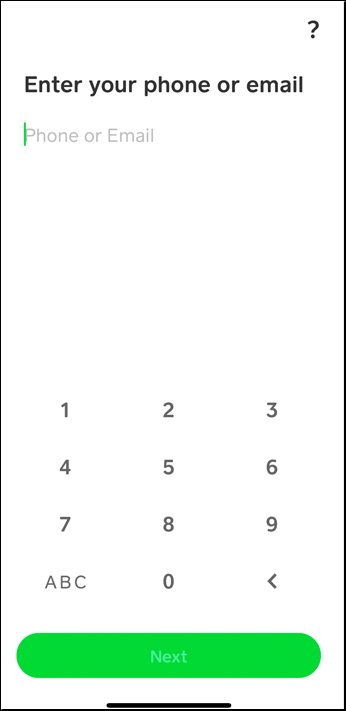
Start by creating a new Cash App account. Open Cash App and sign up with a phone number or email. Enter the verification code and create your Cashtag.
Verify your identity for higher limits
Cash App may ask for your name, date of birth, and the last four digits of your SSN. You do not need a bank account to complete this step.
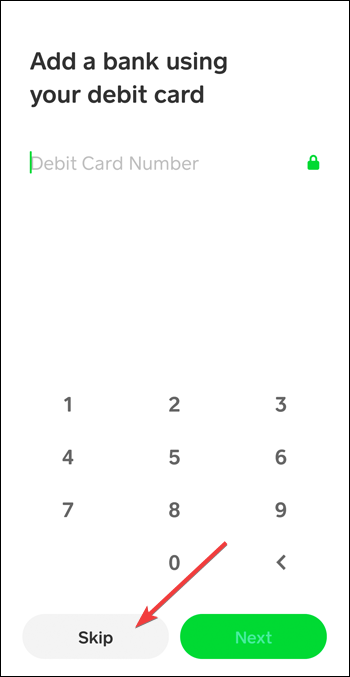
Skip the bank linking step
Cash App suggests linking a bank account during setup. You can tap Skip and continue using your balance with only withdrawal options limited.
How to add money to Cash App without a bank account
Cash App gives you several ways to load funds without attaching banking details.
Receive payments through Cashtag or QR code
Ask friends, family, or customers to send money to your Cashtag. The funds show up almost instantly.

Deposit cash at participating retail stores
You can add paper money in stores like Walmart, Walgreens, and CVS. Cash App generates a barcode for the cashier to scan during checkout.
Transfer from another card you own
You can link a prepaid or debit card to add money. Cash App then draws funds from the card instead of a bank account.
How to spend or withdraw cash without a bank account
You can spend or access your balance with the Cash Card, mobile wallets, or ATMs.
Use your Cash Card for purchases
The Cash Card works anywhere Visa debit is accepted. You can also activate Boosts for discounts.
Withdraw cash at an ATM
Insert the Cash Card, enter your PIN, and withdraw money like a traditional debit card. Cash App charges a fee unless you receive enough direct deposits.
Use your mobile wallet to pay
Add your Cash Card to Apple Pay or Google Pay. This lets you pay in-store and online without physical cards.
What you can do on Cash App without a bank account
You can use most features in Cash App without connecting a bank. This helps users who want a digital payment method without exposing bank information.
Sending and receiving money through your Cashtag
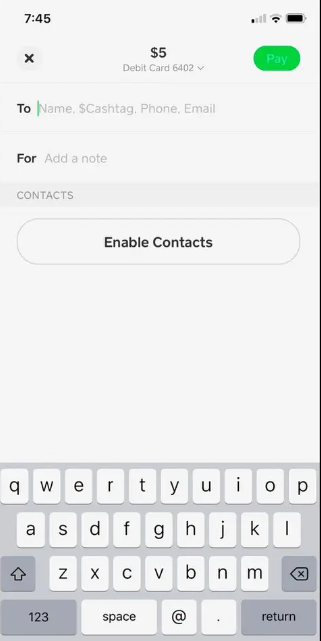
You can send or receive money with your Cashtag, phone number, or QR code. Payments go straight to your Cash App balance.
Using the Cash Card to spend money
Cash App gives you a free Visa debit card that lets you spend your balance in stores and online. You do not need a linked bank to order or use the card.
Using Apple Pay or Google Pay instead of a bank
You can add the Cash Card to Apple Pay or Google Pay for tap-to-pay purchases. This gives you a simple, bank-free way to use your balance.
Limits and restrictions when you do not link a bank account
Cash App applies a few limits when a bank account is not linked. Knowing these helps you avoid declined payments or stuck withdrawals.
Sending and receiving limits
Unverified accounts can send up to a small weekly amount and receive a capped limit. Verifying your identity removes most restrictions.
Cash out restrictions
Instant deposit requires a connected bank account. ATM withdrawals and card purchases still work without one.
Feature availability
Some features, such as direct deposit routing, depend on your verification level. You can still use Cash Card features without a bank.
Troubleshooting common issues
- Cash App asks for a bank account anyway: This happens when you try to use instant deposit. Switch to standard deposit or use the Cash Card instead.
- Cash Card activation problems: Scan the QR code on the card or enter the printed numbers manually. Restart the app if the scan fails.
- Paper money deposit issues: Make sure the cashier scans the active barcode. The barcode expires after a short time, so refresh it if needed.
Tips for using Cash App without a bank account
- Keep your Cash Card activated to avoid withdrawal issues.
- Use mobile wallets for faster payments.
- Enable notifications so you never miss incoming money.
- Verify your identity to unlock higher limits.
- Track your ATM fees to avoid unnecessary charges.
FAQs
Can I still receive money without a bank account? Yes. Payments go straight to your Cash App balance.
Can I withdraw cash without attaching my bank details? Yes. Use the Cash Card at any ATM, though fees apply.
Do I need a bank account to get the Cash Card? No. Cash App ships the card after basic identity verification.
Can I add cash to Cash App without a bank account? Yes. Use paper money deposits or receive payments from others.
Summary
- You can create and verify a Cash App account without linking a bank.
- You can send, receive, and spend money using your Cashtag and Cash Card.
- You can load funds with paper money deposits or another debit card.
- ATM withdrawals and mobile wallet payments work without a bank.
- You only lose instant bank deposits and some advanced features.
You can use Cash App fully without sharing your banking information. These steps help you move money, make payments, and withdraw cash with simple alternatives like the Cash Card and mobile wallets.


Discussion (0)
Be the first to comment.