



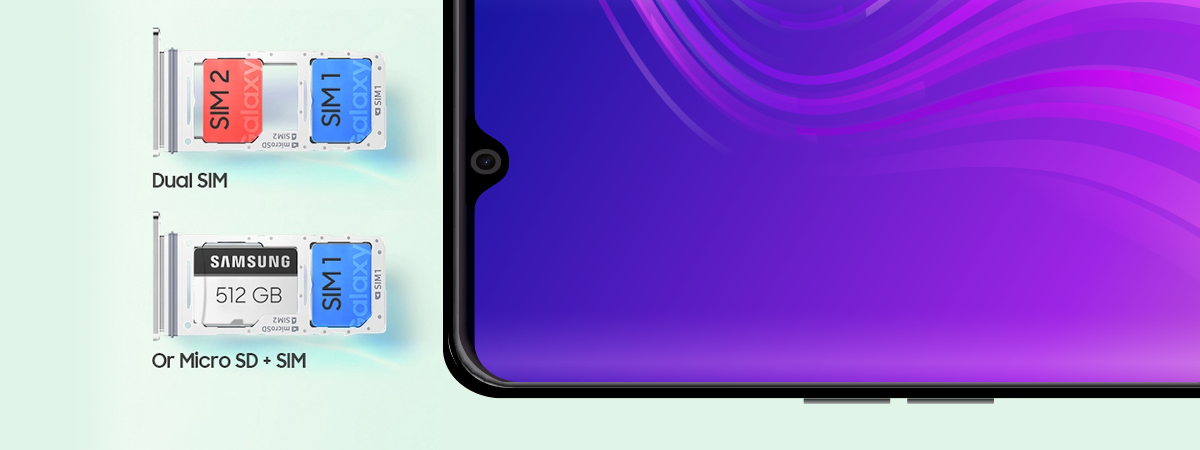
If you’re using a Dual SIM Samsung Galaxy smartphone running Android, you should know how to change its Dual SIM settings according to your needs. You can select a preferred SIM card for mobile data and set which SIM your Android smartphone uses when making calls or sending SMS messages. Or you can enable dual SIM calling and have your device prompt you for the correct SIM every time. You are also able to customize your SIM cards if you need to differentiate between them more easily. This tutorial shows you all you need to know about SIM management on a Samsung Galaxy smartphone:
NOTE: You can also check out our guides explaining what is a SIM card or what is Dual SIM for more details.
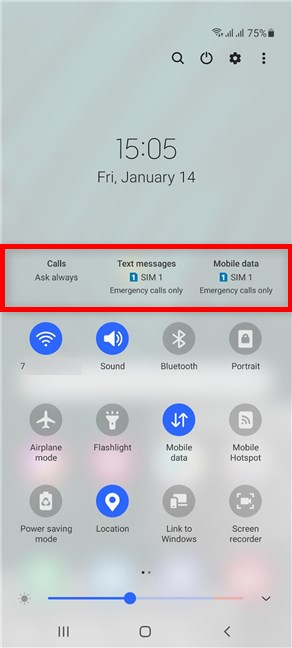
 Multi SIM info in the Quick panel on a Samsung Android
If they’re not shown, you can easily enable the Dual SIM settings. Tap on the More options button from the upper-right corner. Its icon looks like three vertical dots.
Multi SIM info in the Quick panel on a Samsung Android
If they’re not shown, you can easily enable the Dual SIM settings. Tap on the More options button from the upper-right corner. Its icon looks like three vertical dots.
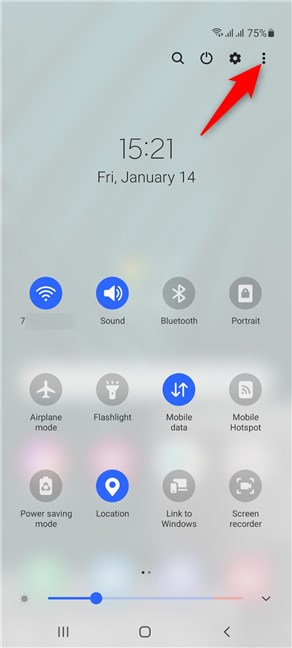 Tap on More options
From the dropdown menu, tap on Quick panel layout.
Tap on More options
From the dropdown menu, tap on Quick panel layout.
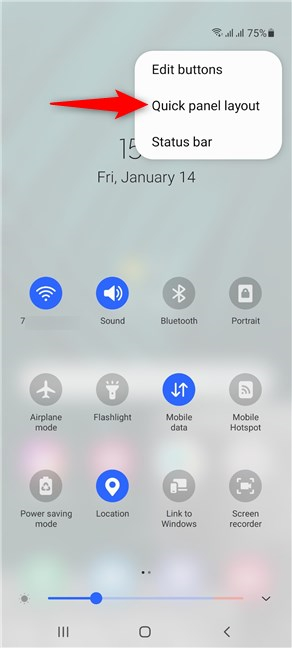 Access the Quick panel layout
If you want the Dual SIM settings shown in the Quick Settings menu, tap on the “Show multi SIM info” option to enable the switch next to it.
Access the Quick panel layout
If you want the Dual SIM settings shown in the Quick Settings menu, tap on the “Show multi SIM info” option to enable the switch next to it.
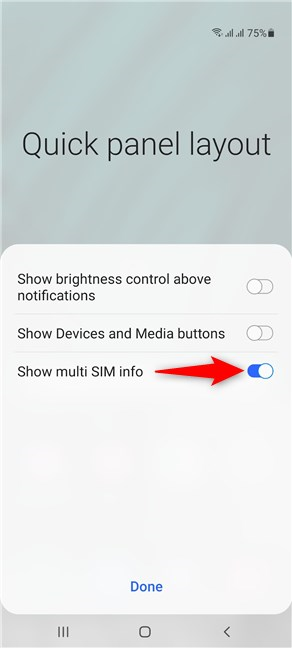 Activate the option to see your Dual SIM options in Quick Settings
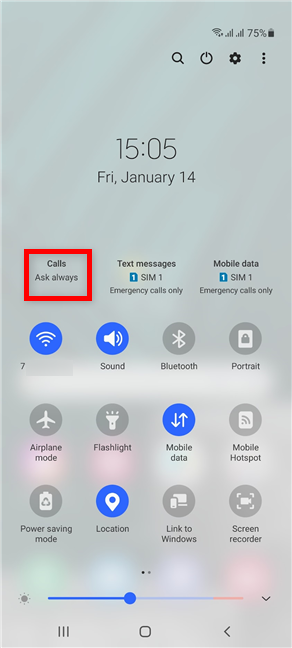 Tap on Calls
In the menu that pops up, you can decide which SIM card you want to use as the default when you make a call.
We recommend selecting the SIM with the best plan for phone calls. However, you can use the Ask always setting if you prefer to switch between the two SIM cards.
Tap on Calls
In the menu that pops up, you can decide which SIM card you want to use as the default when you make a call.
We recommend selecting the SIM with the best plan for phone calls. However, you can use the Ask always setting if you prefer to switch between the two SIM cards.
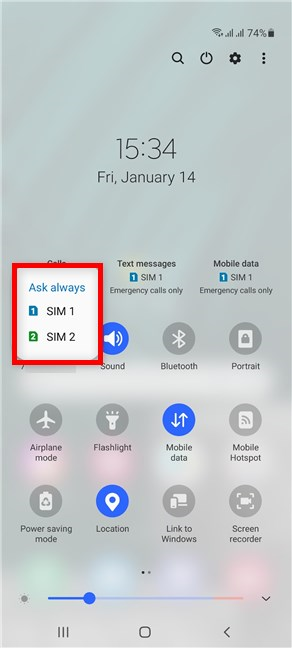 Select the default SIM card for calls
If you go with the Ask always option, you are prompted to make the decision every time you initiate a call, which can become very annoying very fast.
Select the default SIM card for calls
If you go with the Ask always option, you are prompted to make the decision every time you initiate a call, which can become very annoying very fast.
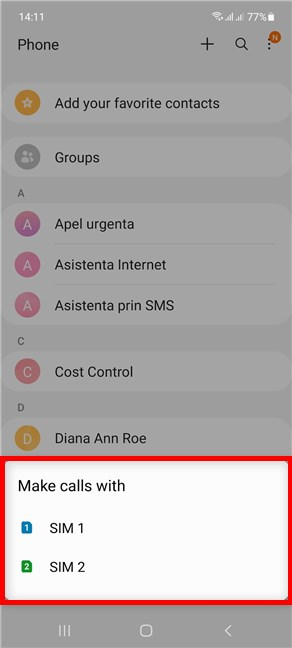 Decide which SIM card to use when you make a call
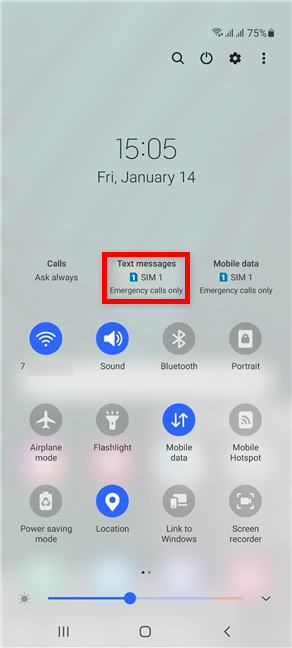 Tap on Text messages
Next, select one of the two SIM cards.
Again, we recommend choosing the SIM card with the best plan for text messages.
Tap on Text messages
Next, select one of the two SIM cards.
Again, we recommend choosing the SIM card with the best plan for text messages.
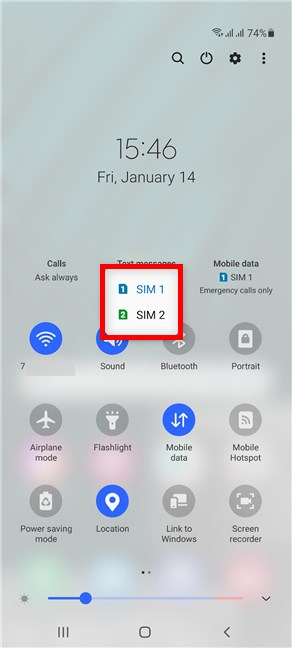 Select the default SIM card for text messages
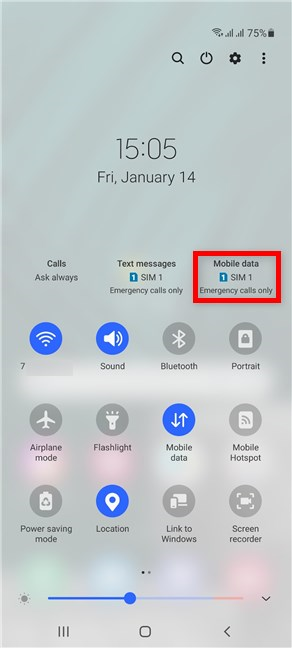 Tap on Mobile data
Then, select the SIM you want to use for mobile data.
Tap on Mobile data
Then, select the SIM you want to use for mobile data.
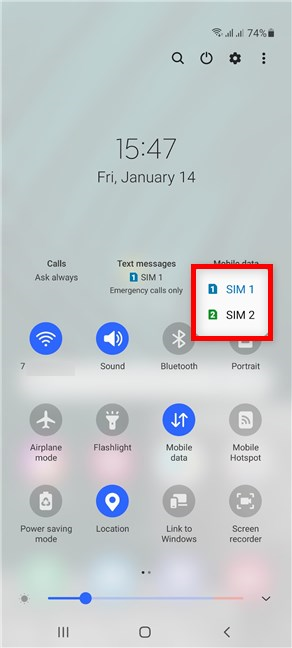 Select the default SIM card for mobile data
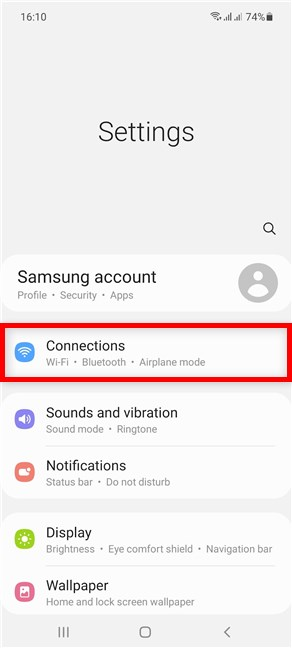 Access Connections from the Settings app
Next, access the SIM card manager.
Access Connections from the Settings app
Next, access the SIM card manager.
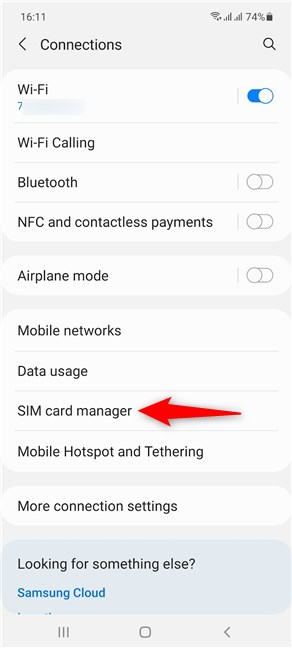 Tap on SIM card manager
This opens the SIM card manager screen, the go-to place to change the Dual SIM settings on your Samsung Galaxy smartphone with Android.
Tap on SIM card manager
This opens the SIM card manager screen, the go-to place to change the Dual SIM settings on your Samsung Galaxy smartphone with Android.
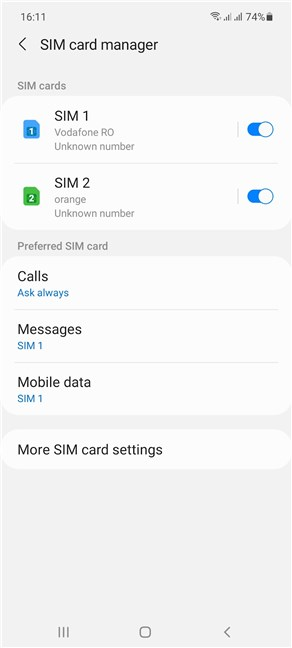 The SIM card manager on Samsung Galaxy
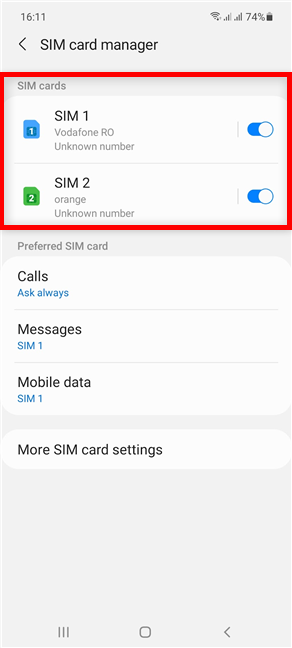 Your SIM cards are shown at the top
On the settings screen for each SIM card, you have categories you can access to change its Icon and Name.
Your SIM cards are shown at the top
On the settings screen for each SIM card, you have categories you can access to change its Icon and Name.
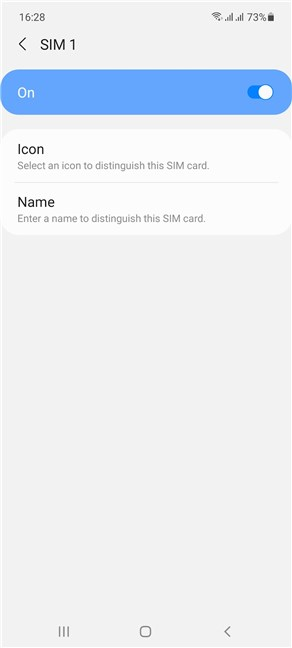 Use the SIM card screen to customize it
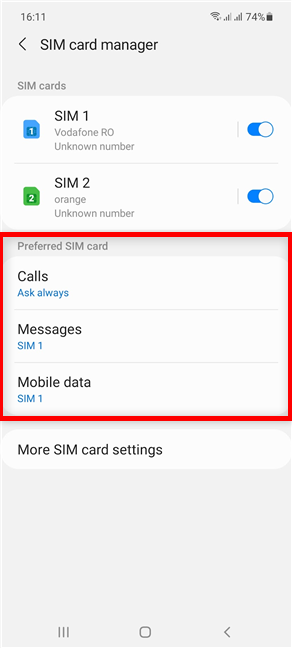 Set the Preferred SIM card for every option
The available options are almost identical to the ones in the Quick Settings panel, described in the previous chapter. The only difference is the option to turn off Mobile data from the corresponding dropdown menu, seen below.
Set the Preferred SIM card for every option
The available options are almost identical to the ones in the Quick Settings panel, described in the previous chapter. The only difference is the option to turn off Mobile data from the corresponding dropdown menu, seen below.
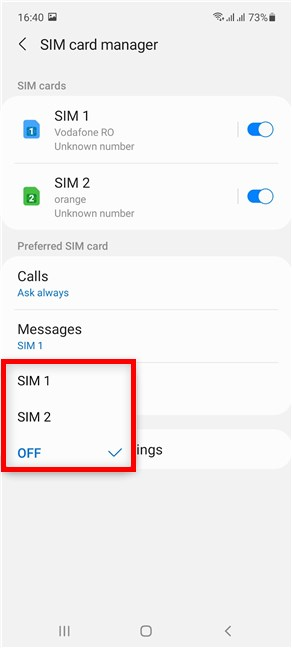 You can turn off Mobile data for both SIM cards
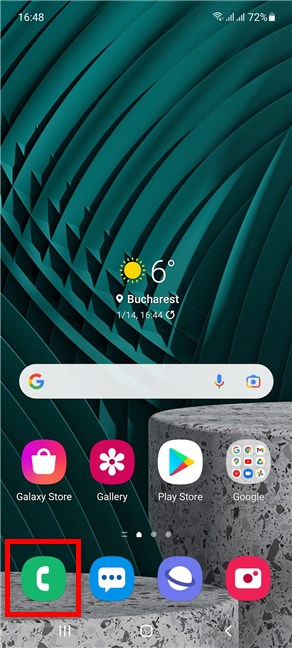 Access the Phone app
Next, tap on More options from the upper-right corner. The icon looks like three vertical dots.
Access the Phone app
Next, tap on More options from the upper-right corner. The icon looks like three vertical dots.
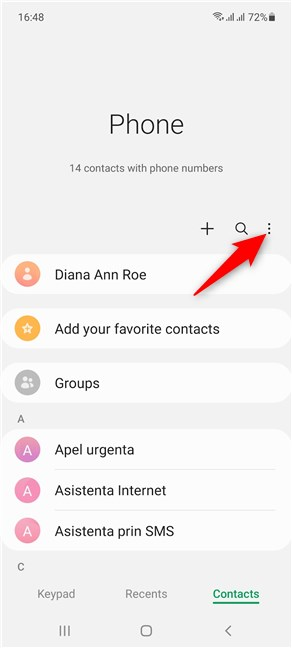 Access More options
This opens a dropdown menu. Tap on the last option, Settings.
Access More options
This opens a dropdown menu. Tap on the last option, Settings.
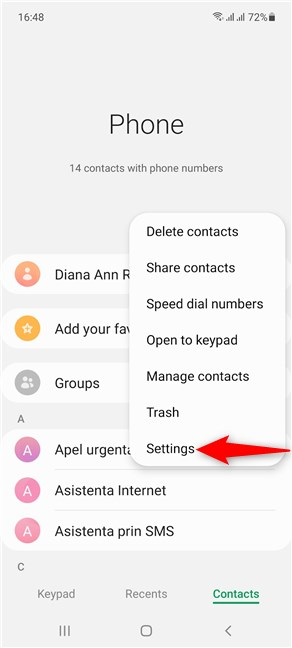 Access Settings
In the Call settings screen, tap on Call background.
Access Settings
In the Call settings screen, tap on Call background.
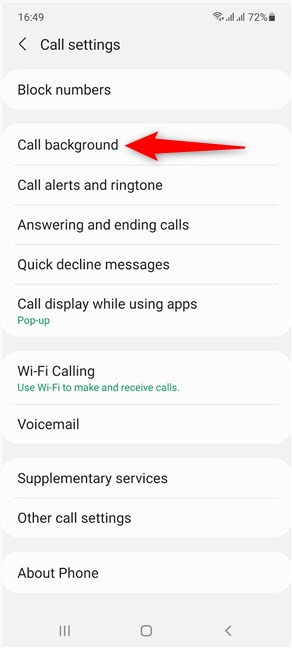 Access Call background
Next, you can select the card and proceed to set a custom background image for it.
Access Call background
Next, you can select the card and proceed to set a custom background image for it.
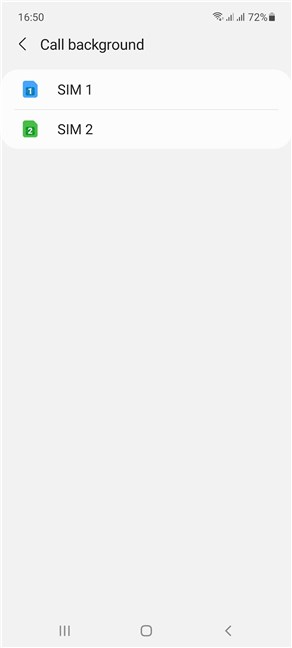 Select a SIM and change the background for any of its calls
You can also access “Call alerts and ringtone” from the Call settings screen.
Select a SIM and change the background for any of its calls
You can also access “Call alerts and ringtone” from the Call settings screen.
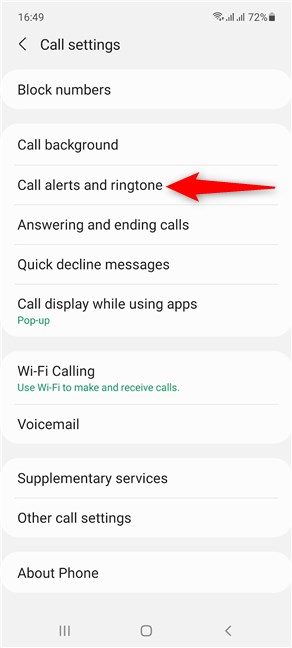 Access Call alerts and ringtone
You can see the Ringtone section displaying the name of the tune used for each SIM card. Tap on it to select a SIM and choose a different ringtone.
Access Call alerts and ringtone
You can see the Ringtone section displaying the name of the tune used for each SIM card. Tap on it to select a SIM and choose a different ringtone.
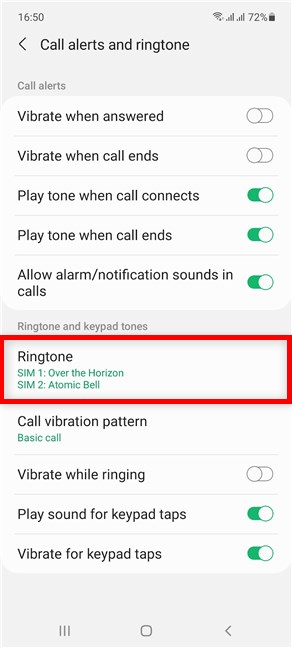 Access Ringtone to change the shown settings
TIP: No matter how many SIM cards you’re using, we recommend using a SIM PIN code to protect them. For more details, check out our guide on the SIM PIN, which includes the reasons we recommend using one.
Access Ringtone to change the shown settings
TIP: No matter how many SIM cards you’re using, we recommend using a SIM PIN code to protect them. For more details, check out our guide on the SIM PIN, which includes the reasons we recommend using one.
How to change the Dual SIM settings from the Quick Settings Panel on Samsung Galaxy
The Android Quick Settings on a Samsung Galaxy smartphone offer a fast way to set the default SIM for calls, text messages, or mobile data. If they are enabled, you should see the three options in the middle of the extended Quick Settings panel.How to set the default SIM for voice calls on Samsung Galaxy
To decide which SIM you use when making a call from your Samsung Galaxy smartphone running Android, tap on the Calls button in the Quick Settings panel.How to set the default SIM for text messages on Samsung Galaxy smartphones running Android
Tap on Text messages to select the default SIM when sending an SMS.How to set the default SIM for mobile data on Samsung Galaxy
Tap on Mobile data to decide on the preferred SIM for connecting to the internet.How to change the Dual SIM settings using the SIM card manager on Samsung Galaxy
Open the Settings app on your Samsung Galaxy smartphone and tap on Connections.How to personalize your SIM cards to identify them faster
At the top of the SIM card manager screen, you can see the two SIM cards inside your smartphone and their status. Tap on either of them.How to set the Preferred SIM card for Calls, Messages, or Mobile data on Samsung Galaxy
In the Preferred SIM card section, you can select the default card you want to use when making calls, sending text messages, or browsing the internet using your mobile data plan. Tap on the corresponding entry and select the SIM card you want to use.How to customize the Call background and ringtone for each SIM card on Samsung Android
When it comes to calls, you can also assign a different background image for each SIM card and use a different ringtone to tell the two cards apart. To begin, open the Phone app on your Samsung smartphone.
Discussion (38)
How to set the phone number associated with each each SIM to avoid the “Uknown phone number” label?
Great tutorial!
Can you also show how to Set Calling SIM by Contact in the messaging section? Thank you
My mobile not shwoing dual mssage settings
What messaging app are you using? I have tried the default Message+ app, Textra, NextSMS and Dual SIM SMS Messenger. I have configured my phone settings to have SIM 2 as my preferred text app (and conversely to troubleshoot, SIM 1 as preferred). In all configurations I can send and receive from SIM 1, but I can only send and not receive from SIM 2, not even when someone replies to a text I sent. I am using a Blackberry Key2LE and both SIMS are from Verizon. SIM 1 is my personal cell and 2 is from my work. Any ideas to troubleshoot the SIM 2 incoming issue?
Thanks for the above very detailed info on the SIM settings on Android phones.
But I still am not clear how to “Set Preferred Network Type” on the second SIM Card.
This I need to send & receive SMS messages separately on each of the two SIM cards.
Pls clarify for me !!
Many thanks again!
Since the last software update I stopped having the sim card selection option for sms sending. I have a Samsung Note 10 lite device. Ihave to go to Settings every time Iwant to change the sim used.
Please advise.
Thank you.
Congratulations for this great and thorough tutorial.
Although, I’ve been looking for an option I can’t find on my Samsung Note 10+ and it’s hard to believe Google and/or manufacturers haven’t thought about.
I want to set different sound modes (i.e. Sound vs Vibration vs Silent) between the #2 SAM’S and I can’t!
One of the uses of a Dual SIM phone is to avoid having #2 different phones for #2 SIM cards.
I get home and I want to silence my work phone. If I do that on an Android I will also switch off my private line.
Is it possible?
Haven’t those brains thought about that feature yet?
Thank you for your kind words! You can try accessing Settings -> Sounds and vibration and set a different Ringtone and Notification sound for each SIM. Then, choose Silent as the ringtone or sound for the SIM you want to mute. This might be time-consuming, but we were unable to find a more comfortable option to do what you want.
Hope this helps. D.A.
Hello, to whomever this reaches bless your would if you can find a way to help me figure this out. I have a Red Hydrogen One phone. It has a dual slot which can double as memory or as 2 dual sims. I get most of the options you show as I am running 8.1.0 but when I put the second sim in. It simply has a pop up message that says “The VZW card in slot 2 will not available, because it is not set as a data card” I’m not sure how to set it as a data card. I’ve accessed the developer options but don’t know what to go in and tinker with. Any advice would help. Thank you in advanced.
Rob
Los Angeles, CA
The first sim1 slot is not functioning that why the preferred data network tab is disabled. How I can change preferred data network to sim card two without having 2 inserted sims?
It didn’t highlight slot 1
I’ve Q mobile noir x 1s. There is no option of select sim messages to always ask..and sometimes i needed to sent message from both sims..is there any setting for this?
I have a phantom 6 plus techno phone from China and it’s a dual sim card phone and it reads both lines differently but I can’t find a Dual SIM card reading in order to tap that dual sim so that I put my both sim cards on WhatsApp same time, please how do I find that dual sim resetting button in order to connect my two lines on WhatsApp than reading sim 1&2?.
i have a s20 dual Sim, but cannot find the settings for them
I have the XT2045-3 Moto G Fast
MO # YDMYI0504AIP
I have a Nokia 5.1 dual sim.
In slot 1 is an Amaysim “text and talk” and in slot 2 an Optus “data only”
Go to Settings -> Network and Internet -> Sim cards and make sure both are on.
Tap Mobile data and set to Optus
Tap Calls and set to Amaysim
Tap SMS and set to Amaysim
I have Huawei P30 Lite and even though it is dual sim (passive) I have no such options like in those pictures to navigate between sims.
I was following along with your video and somehow a sim security passcode turned on an I don’t know what to do it’s a brand new phone it’s model is a
p20 plus. Imei. 355 426 310 280 910
Imei. 355 426 310 280 928. Please help us we need this for work an our new family thank you, [email protected]
My Huawei P10 Lite dual SIM display for SMS and calls is not working since I updated my sytem to EMUI version. Please help. I cant see the “always ask me” phrase in the settings. Intead, it automatically sets a single SIM function only. I used to have dual SIM display on my SMS and dialer portion. Now, its gone. Please help. 🙁
I am on Android 9 (Pie) and do not have a Dual SIM / Dual SIM Management or anything closely resembling it in the menu item under Wireless & Networks in Settings. Where do I look?
Can I interchange sim1and SIM 2 data in one gmail account. That’s what I want to know. Thanks
Is there a way to make a dual sim configuration that will automatically connect to second im when sim 1 doesn’t have network
Thanks so much for your help – it explained so many queries I had. Really appreciated
I’m glad that we have helped you. Do not hesitate to subscribe to our e-mail newsletter, for more useful tutorials.
This article was very helpful, easy to follow. Will definately keep this site in my favourites for any tech type questions. As I am a senior I need all the tech help I can find.
okay, that tells me how to set up 2 sims, but how to use them?
i have just moved from windows (forced to) On a windows phone there are two phone icons. Press icon 1 to make call on 1 or press 2 to make a call on 2.
same goes for messages.
On Android I only get the one sim, so how do I choose, one call at a time, which sim…?
I need to disable outgoing international calls from SIM1. I only want to use SIM2 for internatinal calls. Or, I would like to assign a default SIM to use for outgoing calls to each contact in my favorites. Can this be done by Android or any phone settings? Any help is appreciated
In case sim 1 is set as default for calls,sms,internet. In case while at some places sim 1 is not working due to no network. How to take work from sim 2 without changing slots.
After read this artical i have a very clear picture for dual sim. These was so helpful a
Happy to help. Do not hesitate to subscribe to our newsletter, for more useful tutorials. 😉
Lenovo k6 power
Hi, Can i set up colours for sim cards? I mean for example vodafone is for red, o2 os for blue?
you could if it was a Windows phone…
I am using xiaomi redmi note 5a dual sim – cannot find any of the function on my phone
From what I understand about how Dual SIM “Standby” works, only one SIM has access to the higher bandwidths of 3G, 4G/LTE. The other SIM is delegated to 2G or slower. Although not an Android phone, I am able to send/receive SMS with both SIMs, but with one issue; 2G is not widely supported in my area, and the secondary SIM often will not send/receive SMS messages unless it can find one of those towers.
To overcome this issue, I tried a Dual “Active” SIM phone, which has 2 antennas. SMS and phone calls work fine, and only one SIM can be selected for Data. Unfortunately, it’s difficult to find newer Dual Active SIM phones. The one I have is the ASUS ZenFONE 3 Deluxe. (ASUS is big on dual SIM, but had stopped with Active Dual SIM.) I don’t know of any newer handsets than that. It’s really hard to find this information.
It’s unfortunate that SMS doesn’t work well on Dual SIM Standby, and the public should be made aware of this. Imagine buying a brand-new flagship with dual SIM, and finding out that SMS doesn’t work on both SIMs.
This page was very helpful. I’m new to Android phones and this was very well explained. Thank you!
Glad to help. 😉
Bought a model S93 android 6.0 mtk 6580 octa core cell phone.dual sim but cell server can’t recognize it or make it work on their network